Friday, 9 September 2022

Three main challenges of Cloud Security

 Introduction

In today’s business landscape, cloud security is more important than ever. However, the cloud introduces a new level of complexity which can create significant risk:

  1. Too many surfaces to defend
  2. Too many tools and siloes between teams
  3. Too little context about infrastructure, apps, and data.

This complexity makes it difficult to secure the organization’s most important assets: their data. The best way to combat these risks? Simplify your organization’s cloud security posture!

Challenge 1 – Too many surfaces to defend

The first challenge is the sheer number of surfaces that must be defended. In the past, organizations only had to worry about securing their on-premises infrastructure. And usually, they would do that with a perimeter network design. However, with the cloud, organizations must now secure their data in a dynamic exchange between cloud storage, transit, and use. The opportunities for attackers are immense.

Organizations are started to leverage a Zero Trust design of their cloud infrastructure. Zero Trust design is about giving each user, application, and device the same level of scrutiny. This means there is no longer a “trusted” or “untrusted” network. All networks are treated as untrusted, and all users, applications, and devices must be authenticated…and authorized…before they can access data or resources. This concept makes it more difficult for companies to leverage and validate their design.

Challenge 2 – Too many tools and siloes between teams

The number of tools and siloes between teams has led to a lack of coordination between these teams. This can lead to a situation where each team uses different tools, leading to difficulties in reporting, tracking and auditing.

Organizations run an average of six different tools or features to secure their public cloud environments. Despite this multiple tool implementation, 96% of decision-makers still report that their organizations faced security incidents in the last 12 months:

  1. 45% of businesses have experienced a cloud-based data breach or failed audit over the past year (2022 Thales Cloud Security Study)
  2. Between 2020 and 2021, ransomware-related data leaks increased 82% and interactive intrusion campaigns increased 45%.

More tools result in a fragmented view of your overall cloud environment and various risk assessments….it does not necessarily provide a higher security posture.

Challenge 3 – Too little context about infrastructure, apps and data

Different tools for each domain can increase the visibility in that specific domain but can lead to the lack of context and correlation of findings. It is very hard and time-consuming for security professionals to prioritize risks correctly and efficiently. Also, it is difficult to understand the relationship between different systems and data. This can make it difficult to identify malicious activity and respond to incidents in a timely manner.

What is the solution?

The solution to these challenges is to 1.)simplify your organization’s needs, 2.)reduce the number of tools they are using and 3.)increase the visibility and context of their data.

One way to simplify your organization’s security posture is to validate your cloud security from an attacker’s viewpoint, especially continuously validating the security posture of the cloud with offensive tools from an attacker’s perspective. These offensive (attacker perspective) tools will provide you a comprehensive (continuous, scalable, multiple cloud locations) overview of how strong your cloud security is and where attackers can exploit potential weaknesses.

This approach will allow organizations to prioritize and fix their highest risk priorities that can cause serious damage to their reputation and integrity.

Saturday, 13 August 2022

9 tips for assessing your modern cloud security toolsets


Cloud specific security tooling is essential for protecting your cloud application and data. Today, organizations in the cloud use multiple open source tools to secure their cloud ecosystem across several domains. This includes workload protection, infrastructure protection, application protection, static code analysis and security incident management. How are you evaluating your cloud security toolsets? Here are 9 tips used in the industry to evaluate whether your system is effective…or not!

1. Transparency

With security toolings protecting data from unauthorized access (and most likely several data losses), it inherently has access to sensitive customer information. Tools can only be effective if they are transparent to users. If users are not aware of the tool’s presence, they may inadvertently bypass its security features. Additionally, transparency allows users to see how the tool works and understand its capabilities. To better understand “transparency” of your tool, you should ask yourself two questions:

How does the cloud security vendor manage “operator access” to the data?

Ideally, all the data should be encrypted, however many security tools process sensitive data in clear text. For such systems, it’s prudent for vendor systems and operators to have a process for granting access to authorized users. Your system should ensure that only authorized personnel have access to sensitive data (monitoring operator activity and revoking access if needed).

How is multi-tenancy managed, especially if you use a SAAS security platform?

More and more security businesses are turning to SAAS. With many customer databases kept by SAAS firms, a robust multi-tenant architecture at scale is required. It’s critical to keep 1.)network segmentation, 2.)identity and access segmentation, and 3.)data segregation in place across the tenants so that one tenant’s breach or outage does not have a downstream impact on the other tenants.

How are secrets and data encryption keys managed?

It’s critical to maintain a lifecycle of secrets and encryption keys. Understanding your system’s key creations, rotation policies, access methods, and data deletion procedures ensures that your data protection plan can face various crisis situations.

2. Customization

Security solutions should be adaptable enough to meet your company’s specific control needs and culture. To ensure that it is most beneficial for your users, you may modify the security programs and projects to match your organization’s particular infrastructure. Tailoring integrations with existing systems for logging, monitoring, asset managing and incident responding is critical to fostering successful collaborations.

3. API Driven

The advantages of API-powered security solutions are numerous. First, they may be readily integrated with existing SDLC processes via well-defined API connections. You may use your present infrastructure to boost its capacity and functionality by utilizing this connection. Second, tools that are powered by APIs can automate the tasks that would otherwise be performed by security analysts.

4. Managed service

Modern businesses choose to enable security services in a managed approach. This includes using an intuitive, agentless method to relieve the strain on their ops teams. Managed services are frequently less expensive than buying and maintaining your own security tools. These service providers keep the tools up to date with the most recent security enhancements, detections, findings, and fixes for your specific operations.

5. Understand end-to-end attack paths

The accuracy of risk ratings from security solutions are limited unless they are aware of how cyber attacks operate (and how they can be prevented). These “risk ratings” should focus on a specific sector such as network security, static code analysis, vulnerability monitoring or IAM security. By understanding the end-to-end attack path, the tool can identify potential security vulnerabilities and take steps to mitigate them. Additionally, this understanding can help the tool provide better protection against future attacks and check the effectiveness of your zero trust controls.

6. Contextual to your core business

Your security tool for your business vertical should support your required security standards for your industry (such as NIST, HIPPA, PCI, and ISO). Your tools should create the functionality, business processes and reporting dashboard curated to achieve these security objectives. This contextualization enables the software to more effectively defend against aberrant behaviors that are more likely in your industry sector.

7. Shift-left the security

Shift-left toolsets significantly cut down the time and effort necessary to identify and address risks in production run times. Shift-left security tools seamlessly integrate with the developer experience around CI/CD pipelines. They should be seamless with their IDEs of developer environments to provide comprehensive security feedback as the code is being written.

8. Visibility and control over hybrid-cloud deployments

The hybrid cloud is here to stay, particularly for the crown jewels of legacy data and systems that are still on-premises. The cloud/on-premise integration will endure for a long time into the future.

A cloud-based/on-premise security solution’s centralized “single pane of glass” management console should let you see all of your assets in one spot—regardless of where they’re located.

9. Cost-effective

One of the advantages of utilizing “As A Service” security solutions is that they are cost-effective. By NOT relying on a traditional volume licensing model, SAAS delivers adequate security defense without breaking the bank The pay-as-you-go feature of these toolsets allows for a more predictable and manageable security budget.


Friday, 5 August 2022

Cloud Compliance

 Cloud technology has expanded business capabilities across all industries. However, taking full advantage of the cloud means paying attention to compliance issues that can vary according to your industry and other factors. Without a stringent cloud compliance system in place, you could be making both your business and your customers vulnerable to data breaches and other security-related problems. That is why it is important to have a general understanding of cloud compliance along with a deeper understanding of what it means to your business in particular.

Essentially, cloud compliance means that any cloud-delivered system must be compliant with standards that are specific to each customer. For example, healthcare facilities have to comply with HIPAA standards which are designed to protect the patient’s privacy. HIPAA has strict guidelines concerning how patient data is stored and shared. As a result, any cloud system will need to enact security protocols that will allow cloud systems to effectively comply with HIPAA standards.

It is important to note that compliance is often an ongoing challenge. Security threats are not static and new vulnerabilities can become exposed as technology changes and hackers look for new ways to infiltrate systems. In addition, emerging industry standards and new government regulations can require a constant reassessment of compliance issues in order to stay up-to-date.

Many companies are dealing with the challenges of cloud compliance by creating new positions or outsourcing their compliance issues to specialized companies. Chief Compliance Officers are being assigned to oversee compliance-related challenges and prevent any mistakes. At the same time, companies are looking to free up their IT team and allow them to focus on other areas of the business by hiring outside companies to deal with cloud compliance. These companies are tasked with understanding the industry and all relevant compliance standards. For industries with more complex compliance issues that are subject to change, outsourcing can be an invaluable tool.

Thursday, 21 July 2022

Infrastructure As Code Best Practices

 Development and deployment cycles are running at faster rates than ever before. Through continuous integration and continuous deployment (CI/CD), businesses are able to create and implement applications at a rapid rate. While this is driving innovation, it is also creating new challenges. The faster ideas are traveling through the CI/CD pipeline, the less time there is to address emerging security concerns. This is why Infrastructure as Code Security (IaC) is becoming an increasingly important part of DevOps. Learn more about IaC and how you can leverage it to improve security without having to slow the pace of growth.

Security Best Practices for IaC

You can take full advantage of IaC and improve security by implementing these best practices:

1- Continuous compliance. The best way to ensure compliance is to create clear standards for each stop along the pipeline. Continually reassessing compliance throughout the process according to predetermined rules is an excellent first step toward improved security. This will also allow you to test code against identified threats in a sandbox environment before fully implementing changes.

2- Least privilege principle. To make the process easier, usually DevOps engineers have a master account connecting to the cloud provider and provisioning all the resources with that master account. While this is a fast and easy approach, it is not the most secure approach. The recommendation is to have a set of different accounts with various Role-Based Access Control (RBAC) in place. These allow you to run the IaC code with a minimum privilege access mindset.

3- Monitor and update cloud security and compliance tests. It is also important to address security at the cloud environment level. This should include constant risk assessment and threat modeling. As new users are added and changes are made, you should continue to adjust access control and update firewalls.

4- Keeping secrets in a vault. While connecting to a cloud provider, you need secrets for the initial authentication and accessing resources. These secrets should be kept in a vault for maximum security and all the vault communication should be encrypted as well. Also, you should think about the rotation of secrets to prevent exposing them in the long run.

5- Require encryption. With modern encryption tools, there is no reason not to encrypt all data that is transmitted in the cloud. This is an essential tool that will protect sensitive data and add a layer of protection.

6- Automate alerts. There tool that will update your model repository as the IT and security communities learn about new threats. In addition, AI can be used to identify any abnormalities and automatically trigger alerts. These are important tools that incorporate security into the everyday flow of CI/CD.

7- Staging environments. It is highly recommended to have separate environments for development, QA and Production. Keep in mind, IaC always starts from the development environment and then goes to QA and production. Never deploy something to higher environments while you were not testing that in lower environments.

8- Remove the manual access to the cloud portal. In higher environments (QA, Prod) if developers and DevOps engineers have access to manually change the configurations, you could see configuration drifts from the IaC templates down the line. Always remove individual contributor access to higher environments and just give your developers the Read permission to validate resources manually. If they need to change something, it should go through the IaC process.

IaC provides businesses with the potential to accelerate DevOps and continuously update and improve applications without skipping a beat. This sort of fast-paced environment inevitably creates new security concerns, but there are existing tools and techniques that will allow you to take advantage of IaC while also addressing and reducing security risks. With the right security plan in place, you can confidently use IaC and remain flexible, scalable, and safe.

For additional help designing and implementing an IaC security plan, contact the experts at prancer.

Thursday, 7 July 2022

Cloud Security Testing

In many cases, a cyber attack is only successful if a user takes a certain action, including clicking on a malicious link or entering information into a cloned website. However, with drive-by cyber attacks, malware is spread by targeting websites with security vulnerabilities and without requiring any action on the part of the user. This makes drive-by attacks an especially problematic and insidious type of hack and threat to cloud security. Keep reading to learn more about how this type of cyber attack works and what you can do to prevent your website from being targeted.

Hackers can only initiate a drive-by attack if the website is insecure. They will look for gaps in cloud security that will allow them to insert malicious scripts into the website code. This script can be used to automatically download malware onto the computer of a visitor to the site or redirect visitors to an alternative site that has been created by the hackers. Either way, both the website and the users are victims.

Drive-by downloads are also dangerous because they aren’t limited to website pages. They can also be triggered when a user views an email or looks at a pop-up window. Any app, web browser or operating system can be hijacked and used by the hacker.

How to Prevent Drive-By Attacks

For businesses and website owners, the best way to prevent drive-by cyber attacks is to make sure that your security, browser, and operating systems are up to date. It can be all too easy to forget about updates or fail to double-check that updates were successful, which can create just the sort of security vulnerabilities that make drive-by attacks possible. Be sure to not only schedule updates but make sure to review them to ensure compliance.

In addition, businesses should make sure to remove outdated aspects of the website. As you update or add new software, older tools should be removed. If they are left on the site and not updated with emerging security patches, you have created an easy way to exploit the site. Even if these components are not in use, they can still be used by hackers to insert malware.

It should go without saying that secure passwords are also at the heart of preventing cyber attacks, but some businesses still fail to enforce strong password use. A password generator and management tool can go a long way in supporting cloud security and preventing hackers from guessing weak passwords and easily gaining access to website code.

Finally, be aware of the types of advertisements that your users are being served. While publishing ads on your site can be a great way to generate passive income, this is also a common path for malware. Take the time to monitor the ads that are being shown on your site and make sure that your users aren’t being targeted with ad-based drive-by attacks.

Users should also make sure that browsers and operating systems are running the latest versions. In addition, they should minimize the number of apps and programs on your devices. The more programs you have running, the more likely you are to be the target of a drive-by attack. Pop-up blockers can also be an effective tool to reduce the risk of drive-by cyber attacks.

While drive-by cyber attacks are difficult to identify and prevent, there are steps that both businesses and users can take to reduce the risk of becoming a victim of this type of attack. For more information about different types of cyberattacks, how to prevent them, and ways to ensure compliance, contact the experts at prance . We help businesses across all industries improve cloud security and compliance in ways that also support the DevOps pipeline.

Friday, 24 June 2022

Security Compliance

Prancer Enterprise is announcing that its entire cloud compliance policies repository is now open source. The repository is available on GitHub at

https://github.com/prancer-io/prancer-compliance-test

This move reflects Prancer’s commitment to open source technology and harness the power of community collaboration to move great ideas through the pipeline faster.

These compliance policies that focused on IaC Security and live cloud resources are based on CIS, NIST 800, PCI, HIPPA, HITRUST, CSA CCM and ISO 27001 compliance standards. These policies are all in REGO Open Policy Agent (OPA) language.

Prancer Enterprise platform helps companies achieve end-to-end security in the cloud by shifting security to the left and apply it early in the development process. Cloud DevOps engineers could have an early feedback on the security of the Infrastructure as Code (IaC) templates with every commit they are making to the code.

Prancer Enterprise Cloud Compliance repository has more than 1000 policies both on the Infrastructure as Code (IaC) Security and post-deployment resources. This unique Cloud compliance policy repository is the most significant contribution to the open-source community based on the de facto Rego policy language.

IaC Security policies cover Azure, AWS and Google Clouds. Kubernetes Objects are also supported in the IaC Security. Post-deployment security scans based on these cloud providers help businesses to increase cloud security posture and maintaining security in the cloud.

As more companies begin to rely on cloud technologies, they are also looking for ways to apply compliance to their cloud environment easily and make it a secure place for their workloads. Prancer Platform helps companies to leverage security throughout the lifecycle of their cloud deployment. Prancer Platform integrates into DevOps pipelines and provides IaC Security scan.

About Prancer

Prancer Enterprise (https://www.prancer.io/) provides a pre-deployment and post-deployment multi-cloud security platform for Infrastructure as Code (IaC) and live cloud environments. It shifts the security to the left and provides end-to-end security scanning based on the Policy as Code concept. DevOps engineers can use it for static code analysis on IaC to find security drifts and maintain their cloud security posture with continuous compliance features.


Thursday, 9 June 2022

Offensive Security Testing


Prancer for Offensive Security Testing – An Overview

Offensive Security is a term used to describe the art of attacking and exploiting cyber systems. It is a broad field covering many different areas, including infrastructure security, application security, database security, etc.

Offensive Security tools are used by ethical hackers and penetration testers to test the security of systems and applications. The pentester must understand the application components to formulate the attack he wants to do. Also, the more information they have about the underlying technologies, the attacker can better develop the attack.

There are several open-source and commercial tools for offensive security. Two of the most popular tools in Offensive Security are:

Zaproxy: The ZED Attack Proxy (ZAP) is a powerful open-source penetration testing tool that security experts employ to identify vulnerabilities in web applications. In a nutshell, zap intercepts and examines messages that are sent between a browser and a web application, modifying the contents if necessary and then passing them on to the destination. Zap may be used in numerous pentesting situations, including as part of the OWASP top 10 web and API testing.

Burp SuiteBurp suite is a commercial integrated platform for performing security testing of web applications and APIs. It consists of several tools that allow the pentester to map the application, find vulnerabilities, and exploit them. Burp’s tools can be utilized in numerous ways to perform security testing tasks ranging from very simple to highly advanced and specialized.

There are many more tools to choose from, such as nmap, nslookup/dig, Selenium, Nikto, recon-ng, SpiderFoot, etc.

Offensive Security at scale

Manual pentesting may be more time-consuming and expensive than developing an automation suite. There are numerous tools available that can automate the majority of pentest activities, including security scanning against cloud architectures built on microservices and APIs. In turn, this ability to automate time-consuming manually intensive operations allows businesses to speed up their validation process while also reducing product release cycles

When it comes to the amount of data that can be stored, as well as the sheer scale of cloud CSPs, companies simply cannot keep up with the speed of innovation and the overall scale of the cloud. The only way to catch up with these factors is to automate the security testing as part of SDLC processes.

Thursday, 19 May 2022

Prancer Automated offensive Security Tool

Prancer’s Penetration Testing As Code Framework (PAC) is a cloud-based solution that automates the scaling of penetration testing use cases and the creation of pentest instances on all major cloud providers.

PAC is a powerful offensive security tool that makes performing large-scale distributed penetration tests on cloud infrastructure and apps simple. It’s designed for pentesters, developers, and security experts to simplify the process of detecting cloud environment vulnerabilities by automating them. PAC can be used to test serverless architectures, microservices, and APIs.Instance-based malware detection delivered a fully managed service and was deployed with minimal infrastructure in a serverless style, allowing developers, security experts, and pentesters to programmatically define threats as code and automatically discover vulnerabilities in cloud apps.

Developers may profit greatly from PAC. Developers may design an attack as code and obtain valuable feedback on the security of their application since PAC provides a fully automated and managed pentest experience with limited pentesting expertise. Developers can use PAC to identify vulnerabilities early in the development lifecycle, implement security best practices, and build secure applications by detecting flaws early on.

PAC also benefits security experts. It provides a highly versatile pentest experience with a slew of features and functions. Because PAC obtains information from the Prancer CSPM solution, it can white box cloud application pentesting and minimize false positives considerably by co-relating the infrastructure and application findings.

Conclusion

Whether you’re a pentester or a developer, there are several advantages to employing automated offensive security tools like Prancer for cloud environments. With their capacity to scale and automated end-to-end security testing and validation at scale, you can dramatically improve the release velocity while delivering attack-ready cloud applications.

Wednesday, 4 May 2022

Prancer vs. Cloud security tools


Prancer is a complete end-to-end cloud security platform in contrast to many built-in cloud provider tools, such as AWS Security Hub, Trusted Advisor, Azure Security Center (ASC), Google Security Command Center (SCC), and Prancer. The following are some of Prancer’s significant advantages over CSPs security offerings.

Shift-Left Toolsets
Prancer provides toolsets to enable vulnerability scanning of any IAC, such as Cloud Formation, Terraform, or ARM templates, in IDEs and deployment pipelines. These tools are not included in the default CSP provider toolkits. Prancer believes the security should be moved to the left as a preventative control at the design stage rather than deployment or run time.

Automated pentesting
Cloud applications’ pentesting and vulnerability assessments are still considered manual, even though CSPMs and IACs do preliminary security checks. In this sector, CSPs do not provide any services. Traditional methods demand a significant amount of work from security experts and pentesters, who must manually repeat procedures that lack the reproducibility and process hygiene of software development processes. In today’s CI/CD world, the existence of a manual security testing procedure creates significant operational risks. PAC strives to minimize these barriers. Prancer has developed an automated pentest that uses its patented technology to model actual attack behaviors. This new technology offers earlier detection than manual penetration tests for more accurate results in less time. It provides risk-based insights into vulnerabilities and threats so companies can take action before it’s too late.

Single pane of glass for MSPs
Prancer provides a comprehensive insight into all of your cloud accounts in a single, unified interface with minimal configuration to segment and examines various clients or projects across several CSPs. To surface the reporting of all cloud accounts in a single account with native cloud toolings, you’ll need to go through extra bootstrapping procedures however, with Prancer, you can link all of your cloud accounts with a simple config file.

Managed Policies
Prancer cloud security experts create new security policies and platform updates that are automatically deployed to your infrastructure without requiring any configuration. When a CSP adds new services, controls, and features, the Prancer Policy engine is automatically updated with new configuration policies. You don’t need to manually activate new policies across multiple cloud deployments as you do with CSP toolsets.

Audit and compliance reporting
Without additional setup, Prancer products and services provide extensive monitoring with common compliance standards such as PCI DSS, HIPAA, GDPR, SOC 2 Type II, CIS performance metrics, and others. Cyber risk analyses are generated by several metrics, each of which is connected to a different risk indicator. These reports may be readily exported to PDF or CSV format and include executive summaries at a high level as well as extensive information on each observed finding.

API first approach
All prancer features are accessible through the REST API for custom integrations. This allows you to connect with CI/CD systems, deployment tools, bespoke dashboards, and other business applications. With this, you may use tools you’re already comfortable with, such as Slack, Microsoft Teams, and so on to check your cloud security posture or respond to potential problems.

Auto Remediation
Prancer includes advanced remediation tools that allow you to set issues in your cloud accounts to be resolved right away. With the Prancer Policy engine, you can create and deploy custom auto-remediation rules to address security vulnerabilities.

Friday, 15 April 2022

Security Validation as Code


Introduction

Cloud applications demand security validation to guarantee that the software is safe and compliant with security standards. It also aids in the prevention of data breaches and other threats prevalent to the public cloud.

In the past, security validation was typically done manually by security analysts. This was time-consuming and error-prone. With the rise of DevOps, there is now a better way to do security validation. Security Validation as Code is a new approach that uses automation to validate the security of cloud applications. In this post, we are reviewing a quick background on the subject and highlighting the benefits of Security validation as code.

Challenges with manual Security Validation in the cloud

The majority of the time, security validation is a manual operation. It lacks the repeatability and process hygiene associated with SDLC. In the CI/CD world, the existence of a manual security testing procedure creates significant operational inefficiencies. Moreover, It is difficult to manage and organize security testing across different environments.

Because security testing tools are not always integrated with the application development tools and processes, the results of security testing can be difficult to track and trace back to the source code. It would be difficult to reproduce security issues.

API driven testing to the rescue

The vast majority of modern cloud-native applications and their infrastructure are API-driven. Because every fabric of the cloud is expressed using a consistent interface and atomicity, it is possible to represent most current cloud security validation as code, completely driven by APIs. This allows for more accurate and efficient testing.

By using APIs to drive the testing process, you can better mimic how the application will actually behave when it is used in production. This can help you find and fix problems before they cause issues for your customers.

What is Security Validation as Code?

Security Validation as Code enables validation of cloud applications and infrastructure in a more automated and API-driven way. It uses the same techniques and tools that are used for other types of testing, such as unit testing, integration testing, and regression testing. But all the security tests would be codified and kept in code repositories. To have the Security Validation as Code implemented for your company, you need to have a framework or a processing engine that can validate the cloud applications against the security tests which are available in a code repository and report back the non-compliant resources to the process.

The benefits of Security Validation as Code

Validation as code strives to minimize these barriers. With Security Validation as Code, security experts can define security tests in codes. The codes are shared between multiple parties and applied in various environments. your tests would have repeatability and you can get consistent results across different environments.

With Security Validation as Code, you can marry the speed of the CI/CD process with the high-quality bar of security. You can make sure if the pipeline is completed successfully, all the security tests are passed and the application is ready to be launched.

Security validation as code is also more scalable than manual testing and can be easily integrated into existing processes and tools. Your current SDLC process could have an extra step to security validate the application and environment to make sure all the configurations and codes are under compliance.

What are the challenges of Security Validation as Code?

The biggest challenge with Security validation as code is to find the proper solution that can run the security tests your company is looking for. You need to find a tool that can be easily integrated into the process and read the codes from the repositories.

Also, companies prefer to have a set of ready-to-use out-of-box test cases to run against their applications and environments, rather than developing the security test cases and threat vectors from scratch. This is the problem space Prancer’s PAC attempts to solve. Prancer automatically learns your cloud eco-system and automates the security validation, penetration testing and infrastructure vulnerability assessments.

Security Validation as code is still a relatively new concept, and there aren’t many solutions that provide it. However, we anticipate to see more solutions appear in the near future, as more businesses recognize the value of automating their security testing procedures.

If you’re interested in implementing Security Validation as Code for your cloud applications, sign up for Prancer Platform!


Monday, 4 April 2022

Security Validation as Code


Introduction

Cloud applications demand security validation to guarantee that the software is safe and compliant with security standards. It also aids in the prevention of data breaches and other threats prevalent to the public cloud.

In the past, security validation was typically done manually by security analysts. This was time-consuming and error-prone. With the rise of DevOps, there is now a better way to do security validation. Security Validation as Code is a new approach that uses automation to validate the security of cloud applications. In this post, we are reviewing a quick background on the subject and highlighting the benefits of Security validation as code.

Challenges with manual Security Validation in the cloud

The majority of the time, security validation is a manual operation. It lacks the repeatability and process hygiene associated with SDLC. In the CI/CD world, the existence of a manual security testing procedure creates significant operational inefficiencies. Moreover, It is difficult to manage and organize security testing across different environments.

Because security testing tools are not always integrated with the application development tools and processes, the results of security testing can be difficult to track and trace back to the source code. It would be difficult to reproduce security issues.

API driven testing to the rescue

The vast majority of modern cloud-native applications and their infrastructure are API-driven. Because every fabric of the cloud is expressed using a consistent interface and atomicity, it is possible to represent most current cloud security validation as code, completely driven by APIs. This allows for more accurate and efficient testing.

By using APIs to drive the testing process, you can better mimic how the application will actually behave when it is used in production. This can help you find and fix problems before they cause issues for your customers.

What is Security Validation as Code?

Security Validation as Code enables validation of cloud applications and infrastructure in a more automated and API-driven way. It uses the same techniques and tools that are used for other types of testing, such as unit testing, integration testing, and regression testing. But all the security tests would be codified and kept in code repositories. To have the Security Validation as Code implemented for your company, you need to have a framework or a processing engine that can validate the cloud applications against the security tests which are available in a code repository and report back the non-compliant resources to the process.

The benefits of Security Validation as Code

Validation as code strives to minimize these barriers. With Security Validation as Code, security experts can define security tests in codes. The codes are shared between multiple parties and applied in various environments. your tests would have repeatability and you can get consistent results across different environments.

With Security Validation as Code, you can marry the speed of the CI/CD process with the high-quality bar of security. You can make sure if the pipeline is completed successfully, all the security tests are passed and the application is ready to be launched.

Securityvalidation as code is also more scalable than manual testing and can be easily integrated into existing processes and tools. Your current SDLC process could have an extra step to security validate the application and environment to make sure all the configurations and codes are under compliance.


What are the challenges of Security Validation as Code?

The biggest challenge with Security validation as code is to find the proper solution that can run the security tests your company is looking for. You need to find a tool that can be asily integrated into the process and read the codes from the repositories.

Also, companies prefer to have a set of ready-to-use out-of-box test cases to run against their applications and environments, rather than developing the security test cases and threat vectors from scratch. This is the problem spacePrancer’s PAC attempts to solve. Prancer automatically learns your cloud eco-system and automates the security validation, penetration testing and infrastructure vulnerability assessments.

Security Validation as code is still a relatively new concept, and there aren’t many solutions that provide it. However, we anticipate to see more solutions appear in the near future, as more businesses recognize the value of automating their security testing procedures.

If you’re interested in implementing Security Validation as Code for your cloud applications, sign up for Prancer Platform!

Sunday, 27 March 2022

Automated pentesting – a perfect fit for cloud applications at scale


What is Automated Penetration testing?

Automated Penetration testing is the process of using specialized tools to conduct penetration tests on web applications, networks, and computer systems. These tools can automate many tasks that would otherwise be performed manually by a pentester.

Why is Automated Penetration testing important for cloud applications?

Automated pentesting is an excellent fit for contemporary cloud applications for a variety of reasons. One of the primary advantages of automated pentesting is that it may be expanded to meet the demands of modern cloud apps. Cloud applications are often more complex than traditional on-premise applications. These complexities lie in the technology we are using to develop them, and the cloud providers’ PaaS services contributing to the whole design. Consequently, there are more potential attack vectors for cloud applications. Automated Penetration testing can help us to identify and exploit these attack vectors quickly and efficiently.

Automated pentesting may be run in parallel on a large number of systems, and it can be integrated into the CI/CD process to guarantee that security is built right into the application from the start. Manual pentesting cannot be integrated into the SDLC process of the enterprise. When we are moving to an automated pentesting platform, we have the ability to integrate the pentesting to day-to-day app developers’ flow and find out application-level vulnerabilities faster.

This makes it an ideal match for cloud apps that are constantly being scaled up and down to meet the changing demands.

Monday, 21 March 2022

How to use the Query feature in the Prancer platform


Introduction
The Query feature is a powerful tool inside the Prancer platform that can be used to dig into the cloud configuration data and find the needed information from your infrastructure.
Prancer cloud Security platform enables you to connect to various API providers and Git repositories and convert the files in those repositories into a snapshot based on the JSON format. To have a better insight into your cloud resources, a query can be run to find the configuration you are looking for.
The query feature of the Prancer Cloud security platform is a powerful tool that enables you to find the detailed configuration of your environment, which can either be a live environment in the cloud or the IaC codes in the Git repository.

How to use the Query feature
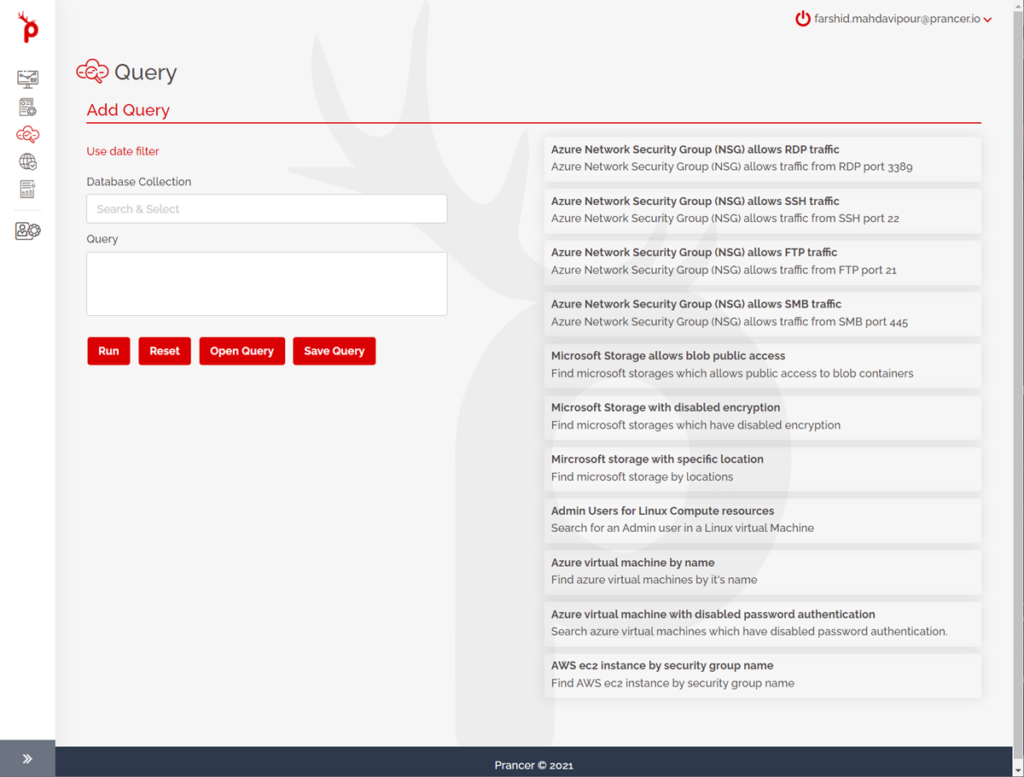
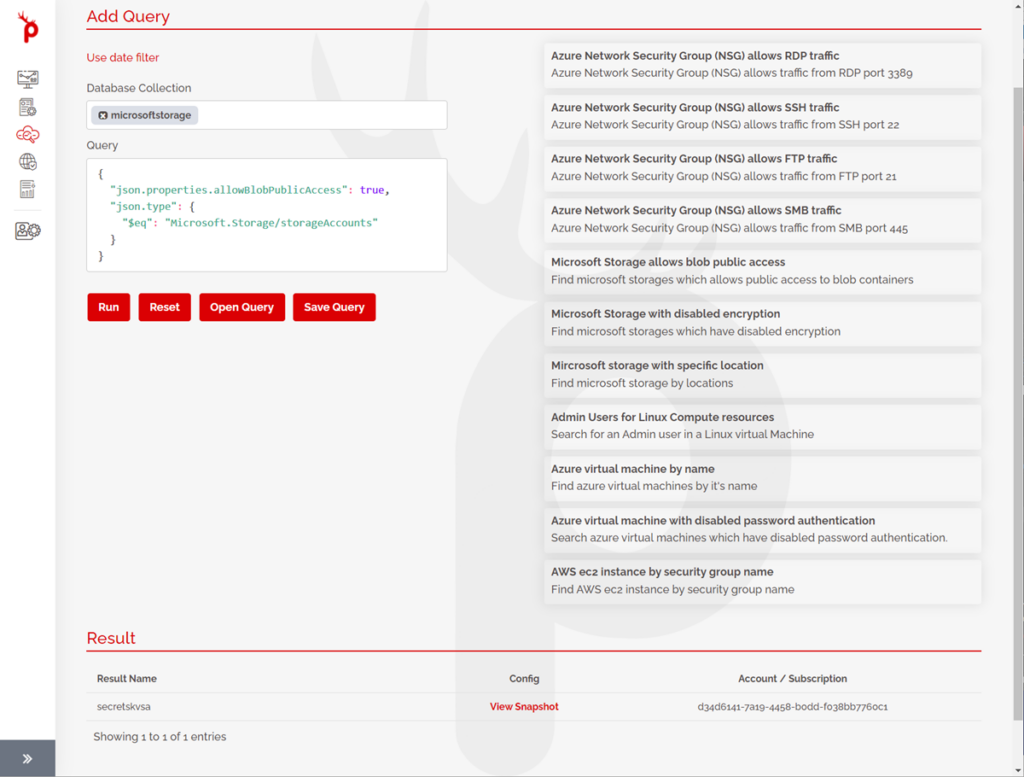
After logging in to the Prancer portal, the third item is the “Query” section on the left pane. When you browse to the page, many sample queries are available for you as the starting point; for example, when the item for the Azure network security group allowing SSH traffic is clicked, it automatically fills out the query section and the query can be run, and the results can be viewed. Moreover, you can view the configuration of the specific resource inside the Prancer platform by clicking on “View Snapshot”.


Prancer Platform queries are all compatible with the MongoDB query language. So, if you know the language, you can write a query from scratch or tweak an existing one from the query section. For example, you are changing the value of a port and rerunning the query after updating it.
Another example, If you want to find the virtual machines, you can use the sample query, tweak it, and then view the results. By clicking on “View Snapshot” and drilling down to the configuration, you can find out which values to modify the query based on the values in the snapshot.

The other powerful feature is while writing a query; you can save the query and use it later. You can give the saved query a name. When you need to use the query sometime in the future, you can load the query and run it again to get the latest results.

This powerful feature helps you to understand the infrastructure configuration in detail. It helps you with the IaC code available in your repository or cloud live resources and writing complex queries to find different resources.