Thursday, 19 May 2022

Prancer Automated offensive Security Tool

Prancer’s Penetration Testing As Code Framework (PAC) is a cloud-based solution that automates the scaling of penetration testing use cases and the creation of pentest instances on all major cloud providers.

PAC is a powerful offensive security tool that makes performing large-scale distributed penetration tests on cloud infrastructure and apps simple. It’s designed for pentesters, developers, and security experts to simplify the process of detecting cloud environment vulnerabilities by automating them. PAC can be used to test serverless architectures, microservices, and APIs.Instance-based malware detection delivered a fully managed service and was deployed with minimal infrastructure in a serverless style, allowing developers, security experts, and pentesters to programmatically define threats as code and automatically discover vulnerabilities in cloud apps.

Developers may profit greatly from PAC. Developers may design an attack as code and obtain valuable feedback on the security of their application since PAC provides a fully automated and managed pentest experience with limited pentesting expertise. Developers can use PAC to identify vulnerabilities early in the development lifecycle, implement security best practices, and build secure applications by detecting flaws early on.

PAC also benefits security experts. It provides a highly versatile pentest experience with a slew of features and functions. Because PAC obtains information from the Prancer CSPM solution, it can white box cloud application pentesting and minimize false positives considerably by co-relating the infrastructure and application findings.

Conclusion

Whether you’re a pentester or a developer, there are several advantages to employing automated offensive security tools like Prancer for cloud environments. With their capacity to scale and automated end-to-end security testing and validation at scale, you can dramatically improve the release velocity while delivering attack-ready cloud applications.

Wednesday, 4 May 2022

Prancer vs. Cloud security tools


Prancer is a complete end-to-end cloud security platform in contrast to many built-in cloud provider tools, such as AWS Security Hub, Trusted Advisor, Azure Security Center (ASC), Google Security Command Center (SCC), and Prancer. The following are some of Prancer’s significant advantages over CSPs security offerings.

Shift-Left Toolsets
Prancer provides toolsets to enable vulnerability scanning of any IAC, such as Cloud Formation, Terraform, or ARM templates, in IDEs and deployment pipelines. These tools are not included in the default CSP provider toolkits. Prancer believes the security should be moved to the left as a preventative control at the design stage rather than deployment or run time.

Automated pentesting
Cloud applications’ pentesting and vulnerability assessments are still considered manual, even though CSPMs and IACs do preliminary security checks. In this sector, CSPs do not provide any services. Traditional methods demand a significant amount of work from security experts and pentesters, who must manually repeat procedures that lack the reproducibility and process hygiene of software development processes. In today’s CI/CD world, the existence of a manual security testing procedure creates significant operational risks. PAC strives to minimize these barriers. Prancer has developed an automated pentest that uses its patented technology to model actual attack behaviors. This new technology offers earlier detection than manual penetration tests for more accurate results in less time. It provides risk-based insights into vulnerabilities and threats so companies can take action before it’s too late.

Single pane of glass for MSPs
Prancer provides a comprehensive insight into all of your cloud accounts in a single, unified interface with minimal configuration to segment and examines various clients or projects across several CSPs. To surface the reporting of all cloud accounts in a single account with native cloud toolings, you’ll need to go through extra bootstrapping procedures however, with Prancer, you can link all of your cloud accounts with a simple config file.

Managed Policies
Prancer cloud security experts create new security policies and platform updates that are automatically deployed to your infrastructure without requiring any configuration. When a CSP adds new services, controls, and features, the Prancer Policy engine is automatically updated with new configuration policies. You don’t need to manually activate new policies across multiple cloud deployments as you do with CSP toolsets.

Audit and compliance reporting
Without additional setup, Prancer products and services provide extensive monitoring with common compliance standards such as PCI DSS, HIPAA, GDPR, SOC 2 Type II, CIS performance metrics, and others. Cyber risk analyses are generated by several metrics, each of which is connected to a different risk indicator. These reports may be readily exported to PDF or CSV format and include executive summaries at a high level as well as extensive information on each observed finding.

API first approach
All prancer features are accessible through the REST API for custom integrations. This allows you to connect with CI/CD systems, deployment tools, bespoke dashboards, and other business applications. With this, you may use tools you’re already comfortable with, such as Slack, Microsoft Teams, and so on to check your cloud security posture or respond to potential problems.

Auto Remediation
Prancer includes advanced remediation tools that allow you to set issues in your cloud accounts to be resolved right away. With the Prancer Policy engine, you can create and deploy custom auto-remediation rules to address security vulnerabilities.

Friday, 15 April 2022

Security Validation as Code


Introduction

Cloud applications demand security validation to guarantee that the software is safe and compliant with security standards. It also aids in the prevention of data breaches and other threats prevalent to the public cloud.

In the past, security validation was typically done manually by security analysts. This was time-consuming and error-prone. With the rise of DevOps, there is now a better way to do security validation. Security Validation as Code is a new approach that uses automation to validate the security of cloud applications. In this post, we are reviewing a quick background on the subject and highlighting the benefits of Security validation as code.

Challenges with manual Security Validation in the cloud

The majority of the time, security validation is a manual operation. It lacks the repeatability and process hygiene associated with SDLC. In the CI/CD world, the existence of a manual security testing procedure creates significant operational inefficiencies. Moreover, It is difficult to manage and organize security testing across different environments.

Because security testing tools are not always integrated with the application development tools and processes, the results of security testing can be difficult to track and trace back to the source code. It would be difficult to reproduce security issues.

API driven testing to the rescue

The vast majority of modern cloud-native applications and their infrastructure are API-driven. Because every fabric of the cloud is expressed using a consistent interface and atomicity, it is possible to represent most current cloud security validation as code, completely driven by APIs. This allows for more accurate and efficient testing.

By using APIs to drive the testing process, you can better mimic how the application will actually behave when it is used in production. This can help you find and fix problems before they cause issues for your customers.

What is Security Validation as Code?

Security Validation as Code enables validation of cloud applications and infrastructure in a more automated and API-driven way. It uses the same techniques and tools that are used for other types of testing, such as unit testing, integration testing, and regression testing. But all the security tests would be codified and kept in code repositories. To have the Security Validation as Code implemented for your company, you need to have a framework or a processing engine that can validate the cloud applications against the security tests which are available in a code repository and report back the non-compliant resources to the process.

The benefits of Security Validation as Code

Validation as code strives to minimize these barriers. With Security Validation as Code, security experts can define security tests in codes. The codes are shared between multiple parties and applied in various environments. your tests would have repeatability and you can get consistent results across different environments.

With Security Validation as Code, you can marry the speed of the CI/CD process with the high-quality bar of security. You can make sure if the pipeline is completed successfully, all the security tests are passed and the application is ready to be launched.

Security validation as code is also more scalable than manual testing and can be easily integrated into existing processes and tools. Your current SDLC process could have an extra step to security validate the application and environment to make sure all the configurations and codes are under compliance.

What are the challenges of Security Validation as Code?

The biggest challenge with Security validation as code is to find the proper solution that can run the security tests your company is looking for. You need to find a tool that can be easily integrated into the process and read the codes from the repositories.

Also, companies prefer to have a set of ready-to-use out-of-box test cases to run against their applications and environments, rather than developing the security test cases and threat vectors from scratch. This is the problem space Prancer’s PAC attempts to solve. Prancer automatically learns your cloud eco-system and automates the security validation, penetration testing and infrastructure vulnerability assessments.

Security Validation as code is still a relatively new concept, and there aren’t many solutions that provide it. However, we anticipate to see more solutions appear in the near future, as more businesses recognize the value of automating their security testing procedures.

If you’re interested in implementing Security Validation as Code for your cloud applications, sign up for Prancer Platform!


Monday, 4 April 2022

Security Validation as Code


Introduction

Cloud applications demand security validation to guarantee that the software is safe and compliant with security standards. It also aids in the prevention of data breaches and other threats prevalent to the public cloud.

In the past, security validation was typically done manually by security analysts. This was time-consuming and error-prone. With the rise of DevOps, there is now a better way to do security validation. Security Validation as Code is a new approach that uses automation to validate the security of cloud applications. In this post, we are reviewing a quick background on the subject and highlighting the benefits of Security validation as code.

Challenges with manual Security Validation in the cloud

The majority of the time, security validation is a manual operation. It lacks the repeatability and process hygiene associated with SDLC. In the CI/CD world, the existence of a manual security testing procedure creates significant operational inefficiencies. Moreover, It is difficult to manage and organize security testing across different environments.

Because security testing tools are not always integrated with the application development tools and processes, the results of security testing can be difficult to track and trace back to the source code. It would be difficult to reproduce security issues.

API driven testing to the rescue

The vast majority of modern cloud-native applications and their infrastructure are API-driven. Because every fabric of the cloud is expressed using a consistent interface and atomicity, it is possible to represent most current cloud security validation as code, completely driven by APIs. This allows for more accurate and efficient testing.

By using APIs to drive the testing process, you can better mimic how the application will actually behave when it is used in production. This can help you find and fix problems before they cause issues for your customers.

What is Security Validation as Code?

Security Validation as Code enables validation of cloud applications and infrastructure in a more automated and API-driven way. It uses the same techniques and tools that are used for other types of testing, such as unit testing, integration testing, and regression testing. But all the security tests would be codified and kept in code repositories. To have the Security Validation as Code implemented for your company, you need to have a framework or a processing engine that can validate the cloud applications against the security tests which are available in a code repository and report back the non-compliant resources to the process.

The benefits of Security Validation as Code

Validation as code strives to minimize these barriers. With Security Validation as Code, security experts can define security tests in codes. The codes are shared between multiple parties and applied in various environments. your tests would have repeatability and you can get consistent results across different environments.

With Security Validation as Code, you can marry the speed of the CI/CD process with the high-quality bar of security. You can make sure if the pipeline is completed successfully, all the security tests are passed and the application is ready to be launched.

Securityvalidation as code is also more scalable than manual testing and can be easily integrated into existing processes and tools. Your current SDLC process could have an extra step to security validate the application and environment to make sure all the configurations and codes are under compliance.


What are the challenges of Security Validation as Code?

The biggest challenge with Security validation as code is to find the proper solution that can run the security tests your company is looking for. You need to find a tool that can be asily integrated into the process and read the codes from the repositories.

Also, companies prefer to have a set of ready-to-use out-of-box test cases to run against their applications and environments, rather than developing the security test cases and threat vectors from scratch. This is the problem spacePrancer’s PAC attempts to solve. Prancer automatically learns your cloud eco-system and automates the security validation, penetration testing and infrastructure vulnerability assessments.

Security Validation as code is still a relatively new concept, and there aren’t many solutions that provide it. However, we anticipate to see more solutions appear in the near future, as more businesses recognize the value of automating their security testing procedures.

If you’re interested in implementing Security Validation as Code for your cloud applications, sign up for Prancer Platform!

Sunday, 27 March 2022

Automated pentesting – a perfect fit for cloud applications at scale


What is Automated Penetration testing?

Automated Penetration testing is the process of using specialized tools to conduct penetration tests on web applications, networks, and computer systems. These tools can automate many tasks that would otherwise be performed manually by a pentester.

Why is Automated Penetration testing important for cloud applications?

Automated pentesting is an excellent fit for contemporary cloud applications for a variety of reasons. One of the primary advantages of automated pentesting is that it may be expanded to meet the demands of modern cloud apps. Cloud applications are often more complex than traditional on-premise applications. These complexities lie in the technology we are using to develop them, and the cloud providers’ PaaS services contributing to the whole design. Consequently, there are more potential attack vectors for cloud applications. Automated Penetration testing can help us to identify and exploit these attack vectors quickly and efficiently.

Automated pentesting may be run in parallel on a large number of systems, and it can be integrated into the CI/CD process to guarantee that security is built right into the application from the start. Manual pentesting cannot be integrated into the SDLC process of the enterprise. When we are moving to an automated pentesting platform, we have the ability to integrate the pentesting to day-to-day app developers’ flow and find out application-level vulnerabilities faster.

This makes it an ideal match for cloud apps that are constantly being scaled up and down to meet the changing demands.

Monday, 21 March 2022

How to use the Query feature in the Prancer platform


Introduction
The Query feature is a powerful tool inside the Prancer platform that can be used to dig into the cloud configuration data and find the needed information from your infrastructure.
Prancer cloud Security platform enables you to connect to various API providers and Git repositories and convert the files in those repositories into a snapshot based on the JSON format. To have a better insight into your cloud resources, a query can be run to find the configuration you are looking for.
The query feature of the Prancer Cloud security platform is a powerful tool that enables you to find the detailed configuration of your environment, which can either be a live environment in the cloud or the IaC codes in the Git repository.

How to use the Query feature
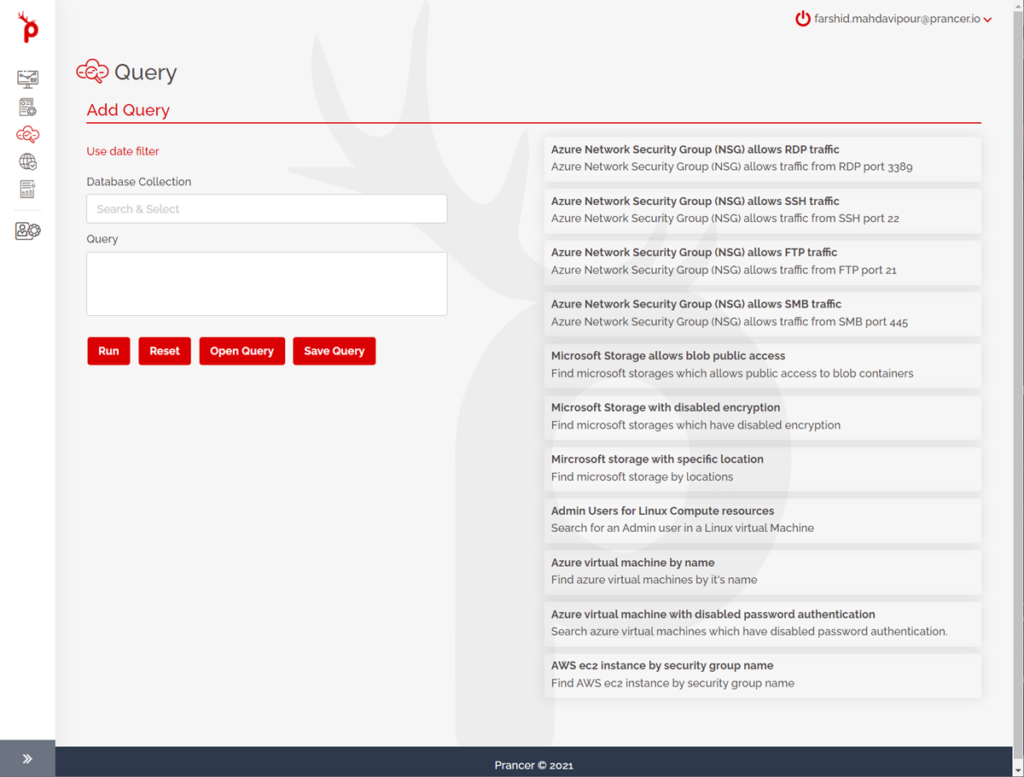
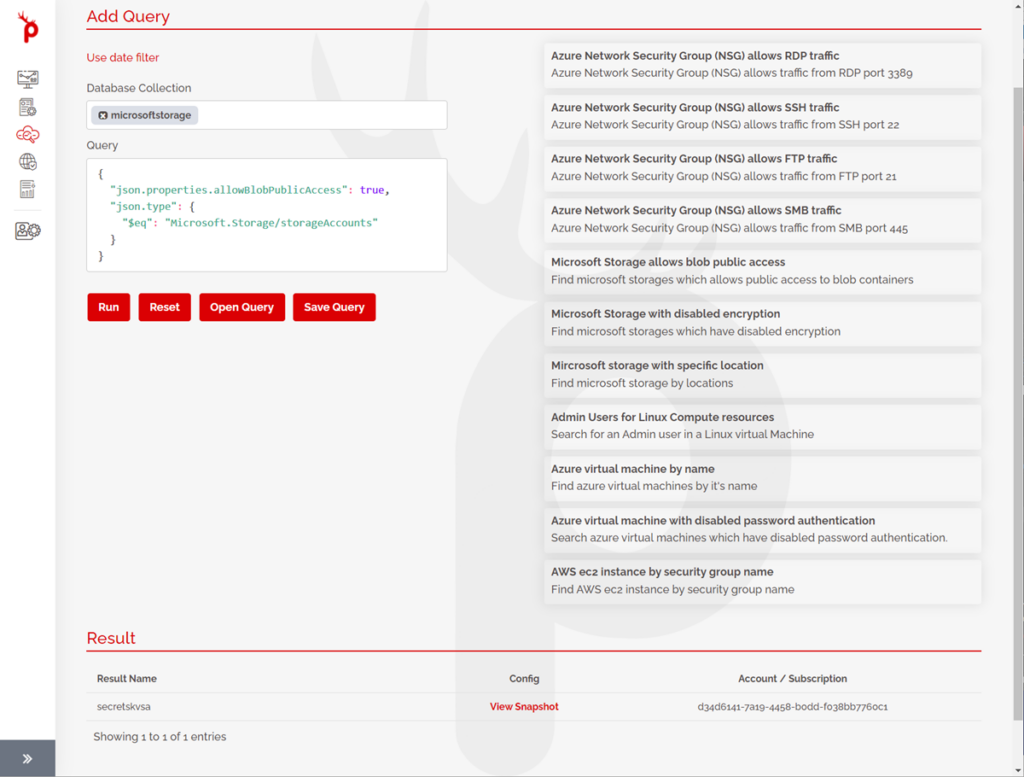
After logging in to the Prancer portal, the third item is the “Query” section on the left pane. When you browse to the page, many sample queries are available for you as the starting point; for example, when the item for the Azure network security group allowing SSH traffic is clicked, it automatically fills out the query section and the query can be run, and the results can be viewed. Moreover, you can view the configuration of the specific resource inside the Prancer platform by clicking on “View Snapshot”.


Prancer Platform queries are all compatible with the MongoDB query language. So, if you know the language, you can write a query from scratch or tweak an existing one from the query section. For example, you are changing the value of a port and rerunning the query after updating it.
Another example, If you want to find the virtual machines, you can use the sample query, tweak it, and then view the results. By clicking on “View Snapshot” and drilling down to the configuration, you can find out which values to modify the query based on the values in the snapshot.

The other powerful feature is while writing a query; you can save the query and use it later. You can give the saved query a name. When you need to use the query sometime in the future, you can load the query and run it again to get the latest results.

This powerful feature helps you to understand the infrastructure configuration in detail. It helps you with the IaC code available in your repository or cloud live resources and writing complex queries to find different resources.


Monday, 14 March 2022

What are the Configuration files in the Prancer framework?

 Introduction


There are different configuration items and files available in the Prancer framework. The Prancer framework is at the heart of the Prancer Platform. The different configuration files available in the Prancer framework are as follows:


Connector
Master Snapshot Config file
Snapshot Config file
Master Compliance test file
Compliance test file

How does Prancer Framework operate in its most basic components?

Connector

The main configuration file is the connector, which is used to connect to different providers. It could be a cloud provider or a git provider. A connector encompasses enough information to connect to the supported external API providers. In the case of the git repository, it’s got the address of the git repository, the credentials, and the branch name. In the case of the cloud, it contains the required way to connect to the cloud, the iam user, secrets, and such information. The cloud could be any cloud supported by prancer – Azure ,AWS or GCP.

Snapshot Configs

The Master Snapshot Config file contains the type of resource to get the configurations out of them , i.e. in the case of Azure, it could have the information to get all the virtual machines, all the vnets, or all the security groups. Master Snapshot configuration file cares about the types of resources from the cloud provider. In the case of the git, it could be to get all the JSON files, all the YAML files, all the terraform files, which again are types of resources being looked for. All the details to connect to various resource types are stored in the Master Snapshot Config file.

Inside the Prancer framework, there’s a crawling engine (a feature called crawler), which connects to the external provider using the connector, and based on the configuration that is present in the Master Snapshot Config file, it can find all the resources in the external provider, and generate another file called a Snapshot Config file.

In the Snapshot Config file, there are individual resources, unlike the Master Snapshot Config file, which contains the type of resources that we wish to get information about, e.g. when asking for virtual machines from the external provider, the crawler crawls the external provider resources and finds all the virtual machines present, for instance, vm-1, vm-2, vm-3, up until vm-10. In the case of git for IaC, the crawler connects to the git repository, based on the Master Snapshot Config file, which asks for all the YAML files, so the crawler finds all the individual YAML files in the git repository and generates a Snapshot Config file for the individual files that are available.

Tests and compliance tests

Another configuration file available in the Prancer frameworks is the Master Test file,which contains enough information to run tests against the type of resources that are present. For example, checking if all the virtual machines are using a public IP address, or testing all security groups and checking if they are using port 22 to allow an inbound SSH connection. All these test cases are stored in the Master Test file

On another side, we have the test file. A test file is related to individual resources. When the crawling feature is used, the test file is not being used, but when individual resources are used rather than the crawling feature, a test file is used for individual tests.

How all of these configuration files work together

Prancer framework uses the connector to connect to an external provider. The Crawler feature uses the Master snapshot configuration file to find all the resources mentioned in the master snapshopt configuration file and generate the snapshot configuration file which contains individual resources. Then the framework will generate Snapshots, which are the confirmation of the resources we want to keep for testing. Then the Compliance Engine can start running the testcases against the resources available as the snapshot, The tests and the compliance on these snapshots are run based on the master tests, and understood if those resources are compliant or not.


while running the testcases against the available snapshots, an output file is being generated which contains the report we are looking for. if the resource is passed or failed and the related compliance testcases. All the reporting details needed are available in the output file.


This process consisting of crawling and compliance tests can be run as many times as needed – based on the changes occurring in the cloud. All these configs and output files are stored in a container folder which is called Collection. We can have as many Collections as required for our testing purposes.

The Collection is a very powerful feature. We can use the Collection concept for various purposes. We can have a collection based on each project, based on each customer, or based on each business unit (based on how the user would like to interpret the collection in their specific business area).

A collection is basically like a folder that encompasses all these items. In the Prancer framework, there can be multiple collections, like a collection for Azure, one for AWS, one for the GitHub repository, one for a specific project in the git, and so on. Also, in each collection, there could be multiple connectors, multiple master snapshot config files, multiple master test files. It’s not restricted to a single file for each type seen here.

The concept of Collection gives the user a very powerful mechanism to scale up their security posture based on the prancer framework.

Remote Configuration files

Prancer Framework supports two types of test formats. The simple testcases which are an inhouse query language on JSON files, and also tests based on the Open Policy Agent (OPA) Rego policy language, All the Rego test files are also available in the same collection, e.g. if there are 100 test cases based on the Rego, the files are available in the same collection directory. That’s how the people working with the Prancer framework do the compliance test.


Suppose there are multiple Collections available for the company and the user wants to centralize the management of test files, Rego files, and snapshot files. It is possible to store all of these items in a remote git repository and read them from a centralized location. In this case, instead of creating the full Master test files and Master snapshot configuration files, 2 pointers are employed – a Master Snapshot Config pointer and a Master Test file config pointer – which point to the remote git which reads the information and gives the user the ability to leverage the power of Policy as Code and centrally manage the master test files, Rego files, and also the Master Snapshot Config files. The process for running the Prancer framework would be the same but instead of having a local Master Snapshot config, it connects to the remote git and gets the information from the remote master snapshot. And at the time of testing, the Compliance Engine connects to the remote master test files and the remote Rego files rather than the local files, but everything else like the snapshot and outputs will be stored locally in the collection.

In this article, I have introduced various configuration files available in the Prancer Framework, which is the heart of Prancer Platform. By understanding these concepts, you have an easier time navigating through our solution and understand the details of the application.